| 일 | 월 | 화 | 수 | 목 | 금 | 토 |
|---|---|---|---|---|---|---|
| 1 | 2 | 3 | 4 | |||
| 5 | 6 | 7 | 8 | 9 | 10 | 11 |
| 12 | 13 | 14 | 15 | 16 | 17 | 18 |
| 19 | 20 | 21 | 22 | 23 | 24 | 25 |
| 26 | 27 | 28 | 29 | 30 | 31 |
- 금리 정책
- SK하이닉스
- 경제공부
- 재건축 촉진
- 주택 공급 대책
- 글로보는손경제
- 남궁민작가님
- 장마
- Shortcut
- 손경제
- 아이폰
- 손에잡히는경제
- 대출 규제
- 한국은행
- 손경제플러스
- 부동산 시장 동향
- 서울집값
- 엔비디아 실적
- 배당주
- 박정호교수님
- 금리 인하
- 미국주식
- 단축어
- 알리발
- 짭에어태그
- 파운드리
- 이진우기자님
- 그린벨트 해제
- 엔화 가치
- 손경제요약정리
- Today
- Total
영글로그 - 영상을 글로 만든 블로그 :)
웹브라우저용 메모장 본문
웹 브라우저에서 사용 가능한 메모장 입니다. 기존에 어떤 다른 능력자 분이 만들어 두셨는데 몇가지 업데이트 해서 좀더 기능을 넣었어요~
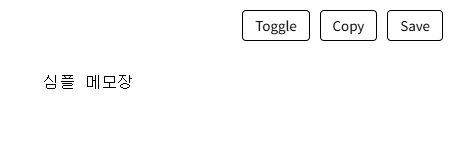
1. 사용방법
- 아래 주소를 통으로 긁어서 복사한다.
- URL을 넣는 곳에 그대로 붙여 넣는다. (즐겨찾기에 추가한다)
- 메모장 처럼 쓴다.
- Toggle - Day/Night 로 변환한다. / Copy - Clip Board에 저장된다. / Save - 즉시 Download 가 됩니다.
2. URL
data:text/html,https://www.shareicon.net/data/128x128/2015/10/07/113773_tags_512x512.png"%20rel="shortcut%20icon">https://fonts.googleapis.com/css?family=Roboto+Mono:400,700%22%20rel=%22stylesheet%22%3E%3Cstyle%3Ebody{margin:0;background:%23fff;color:%23000;overflow-x:hidden}body.d{background:%231e1e1e;color:%23eee}%23e{font-size:12pt;line-height:1.5em;font-family:%27Roboto%20Mono%27,monospace;width:100%;padding:80px;min-height:100vh;outline:none;box-sizing:border-box;white-space:pre-wrap;word-wrap:break-word}.b{position:fixed;top:20px;right:20px;display:flex;gap:10px;z-index:99;user-select:none}button{font-family:inherit;font-size:10pt;background:transparent;color:inherit;border:1px%20solid%20currentColor;padding:5px%2012px;cursor:pointer;border-radius:4px;background:rgba(255,255,255,0.1)}%3C/style%3E%3C/head%3E%3Cbody%3E%3Cdiv%20class=%22b%22%3E%3Cbutton%20onclick=%22document.body.classList.toggle(%27d%27)%22%3EToggle%3C/button%3E%3Cbutton%20id=%22cb%22%20onclick=%22C()%22%3ECopy%3C/button%3E%3Cbutton%20onclick=%22S()%22%3ESave%3C/button%3E%3C/div%3E%3Cdiv%20id=%22e%22%20contenteditable=%22true%22%20spellcheck=%22false%22%3E%3C/div%3E%3Cscript%3Efunction%20S(){const%20t=document.getElementById(%27e%27).innerText;const%20a=document.createElement(%27a%27);a.href=URL.createObjectURL(new%20Blob([t],{type:%27text/plain%27}));a.download=%27memo_%27+Date.now()+%27.txt%27;a.click()}function%20C(){const%20e=document.getElementById(%27e%27),t=document.createElement(%27textarea%27);t.value=e.innerText;document.body.appendChild(t);t.select();document.execCommand(%27copy%27);document.body.removeChild(t);const%20b=document.getElementById(%27cb%27),o=b.innerText;b.innerText=%27Done!%27;setTimeout(()=%3Eb.innerText=o,1000);const%20m=document.createElement(%27div%27);m.innerText=%27Copied%27;m.style=%27position:fixed;bottom:30px;left:50%;transform:translateX(-50%);background:rgba(0,0,0,0.8);color:%23fff;padding:8px%2016px;border-radius:20px;font-size:10pt;z-index:9999;transition:opacity%200.3s%27;document.body.appendChild(m);setTimeout(()=%3E{m.style.opacity=%270%27;setTimeout(()=%3Em.remove(),300)},1200)}%3C/script%3E%3C/body%3E%3C/html%3E
3. 저작권
- 별도로 없으니 마음껏 퍼다 쓰세요~
'테크 팁(Tech Tip)' 카테고리의 다른 글
| 드리프트 고스트 XL wifi drv error 수리기! (DRIFT GHOST XL, wifi fixed) (0) | 2024.06.12 |
|---|